
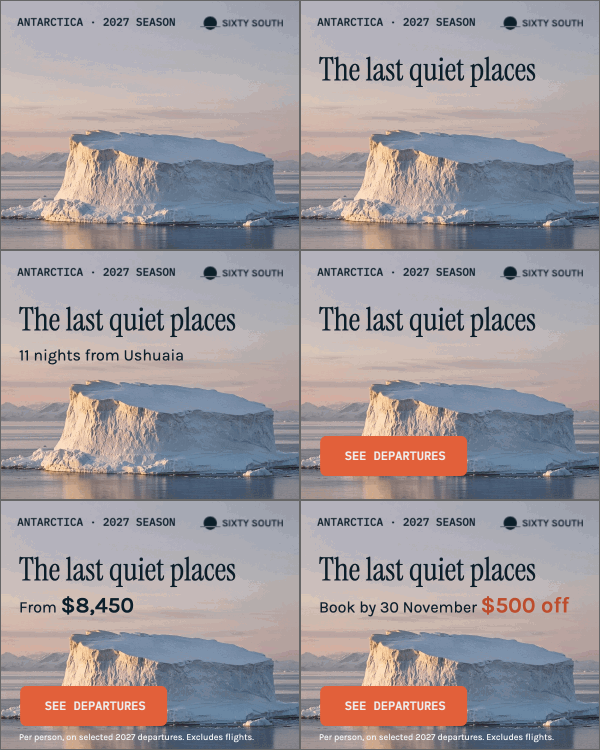
Start with the required dimensions
Use the placement’s pixel size. A 2× export doubles both dimensions and produces four times as many pixels per frame; it does not guarantee a sharper result in every placement.
Another format on the delivery list
The placement asks for an animated image. Export your Foldwrap creative as a GIF, check the motion and file size, and keep the source ready for the next revision.
For campaign creatives that need an animated-image deliverable.

From your creative to an animated image
Open the variant you need. Refine the headline, offer and CTA timing before export. Starting with a static design? Add automatic animation, then review the motion.
Explore automatic animation ↗Use Export GIF. Check the output dimensions and frame-rate setting, then let Foldwrap render the creative into an animated image.
Preview the result and download it. Confirm its weight, appearance and looping behavior against the placement requirements before uploading.
Make the format work for the creative
GIF stores an animation as a sequence of images. Moving photography and longer sequences can increase file size, even at small dimensions. Measure your export against the brief.
Use the placement’s pixel size. A 2× export doubles both dimensions and produces four times as many pixels per frame; it does not guarantee a sharper result in every placement.
Shorter animation and fewer frames can reduce weight. Try a lower frame-rate setting and check the result for readable copy and smooth enough movement.
Foldwrap quantizes each GIF frame to a palette of up to 256 colors. Inspect gradients, shadows and photography for visible color steps or lost detail.
One check that matters before delivery
Foldwrap’s current browser GIF export loops continuously. That makes a repeating preview easy, but it may not meet a placement that requires animation to stop after a fixed time.
Watch the transition from the last frame back to the first. Keep the message readable through the loop.
Before you send it
Check animated GIF support, dimensions, file-size limit and animation rules with the destination. Do not assume a GIF is accepted wherever an image upload is available.
Links are supplied by the host page or ad platform. Buttons inside the rendered GIF are pixels, not independently clickable elements.
Browse ad platform specifications ↗Pick the deliverable the brief needs
Choose it when the destination specifically accepts animated GIFs and your export meets its weight and playback rules. It carries no sound.
Consider MP4 or WebM when the destination accepts video, especially for photographic motion and richer color transitions.
Explore video export ↗Choose native HTML5 for supported display placements that need browser-rendered text, animation and platform-specific click handling.
Explore HTML5 banner export ↗The GIF deliverable
Yes. Open a Foldwrap creative, choose the variant and use Export GIF. Set the dimensions and frame rate, render, preview and download. Check the file against the destination’s requirements before delivery.
There is no automatic target-file-size control. GIF weight depends on dimensions, animation length, frame count and visual complexity. Adjust these, export again and measure the result. A complex creative may need a different format if the destination allows it.
The current browser GIF export is encoded to repeat continuously. Do not assume the editor’s playback setting produces a finite-loop GIF. Check the delivery rules; a placement that requires animation to stop may need another format or an additional finishing step.
GIF uses indexed color. Foldwrap builds a palette of up to 256 colors for each exported frame, so gradients, photographs and subtle shadows can lose detail. Inspect the rendered output; video may be a better choice when the destination accepts it.
Use it where the email system, page or placement supports animated GIFs. Test the actual destination, including its file-size and playback behavior. Set any click-through link outside the GIF; the image itself has no interactive buttons.
The words become pixels in the exported image. Keep your Foldwrap creative or a .foldwrap source package, make copy and timing changes there, then export a new GIF.
Complete the delivery list
Export an animated image from your Foldwrap creative. Make future copy and timing changes in the source, then render again.