
Creative automation in advertising has moved from a "nice to have" to a production necessity. Teams now need more formats, more sizes, more market variants, and faster turnaround, while campaign timelines keep shrinking.
If you still build every ad manually, production quickly becomes the bottleneck: slow revisions, messy approvals, repetitive resizing, and avoidable QA errors. Creative automation solves that by turning ad production into a repeatable system.
This guide explains what creative automation is, why it matters for agencies and freelancers, and what to automate first.
What is creative automation in advertising?
Creative automation is a workflow where software handles repetitive ad production steps: animation, resizing, adaptation, versioning, and export preparation.
Instead of rebuilding each banner from scratch, teams work from one approved creative system and generate consistent variants for channels, audiences, and markets.
In practice, ad creative automation helps you:
- Move from design to launch faster
- Reduce manual production work
- Keep output more consistent across variants
- Scale campaigns without scaling headcount linearly
Why teams are moving to ad creative automation
Advertising operations are more complex than they were a few years ago. Most teams are dealing with the same pressure points:
- More channels and placements to support.
- More campaign testing and iteration cycles.
- More localization and audience-level personalization.
- Less tolerance for production delays and manual errors.
For freelancers, this means tighter client timelines and revision pressure. For agencies, it means managing output quality across many clients at once. For performance teams, it means creative throughput directly affects campaign results.
Core benefits for agencies and freelancers
1. Faster production cycles
The biggest win is speed. When animation, resizing, and adaptation stop being fully manual, teams can produce more ads in less time.
That speed translates into real operational advantages:
- Faster response to trend shifts and campaign data
- More concepts tested per budget cycle
- Faster mid-flight creative updates
2. Faster approvals with less chaos
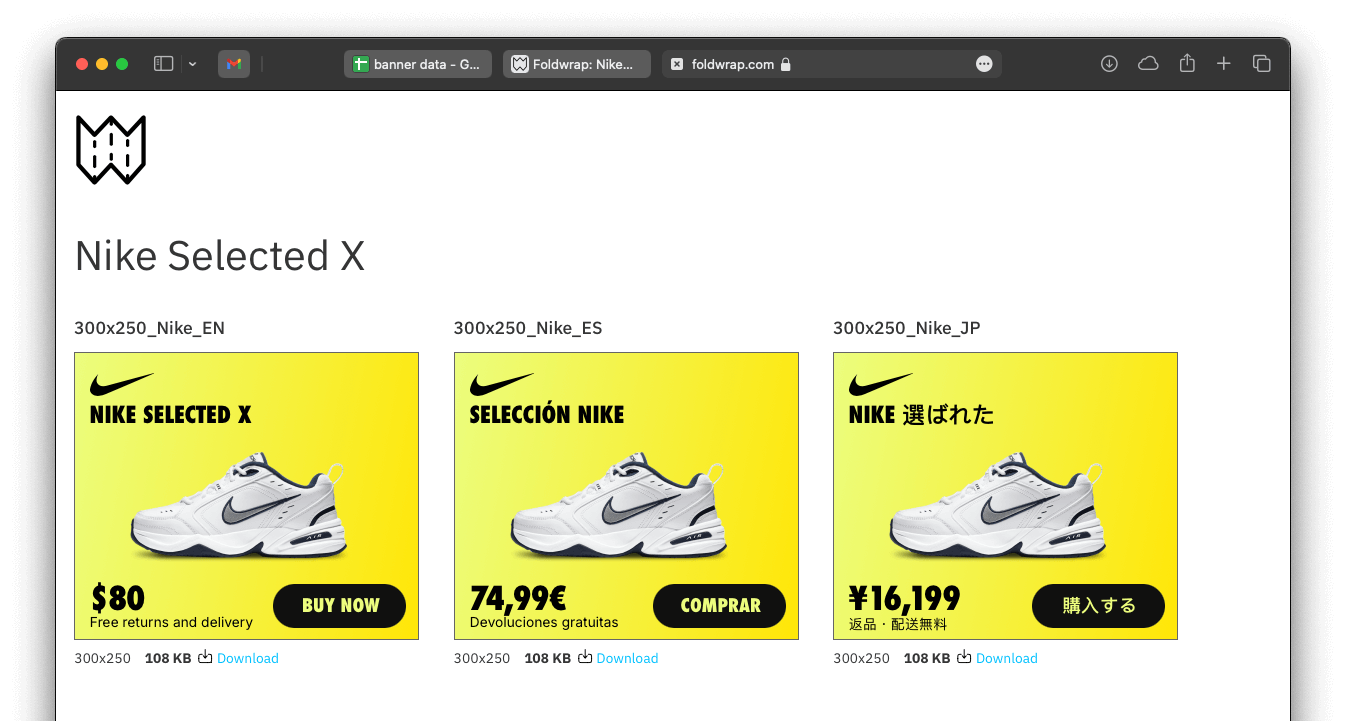
Traditional approval loops create friction: scattered files, naming mismatches, delayed feedback, and repeated handoffs. Creative automation tools reduce this by keeping versions organized and review-ready.
With Foldwrap, teams can present multiple variants side by side for quick stakeholder comparison and approval, reducing back-and-forth and shortening review cycles.
3. Fewer manual errors and stronger brand consistency
Manual ad production at scale usually introduces small errors that become expensive later: typos, spacing issues, color drift, or incorrect formatting for platform constraints.
Automation helps reduce these risks by standardizing repetitive steps and reusing controlled creative structures.
4. Easier scaling across sizes, markets, and segments
Scaling ad campaigns means producing many versions of the same core message:
- New sizes for additional placements
- Localized versions for different markets
- Personalized versions for audience segments
This is where creative automation has the highest ROI. Instead of duplicating manual work, teams can generate and adapt variants from one system. Foldwrap, for example, supports this with workflows like scaling banner ads via Google Sheets and the ability to copy animation across sizes instead of re-timing every variant by hand.
What to automate first (quick wins)
If you are introducing creative automation now, start with the highest-friction tasks:
- Design-to-animation handoff (especially Figma-based workflows, and a good moment to revisit an Animate-based pipeline now that Animate is feature-frozen)
- Multi-size adaptation and resizing
- Review and approval presentation
- Localization and content variation generation
- Export setup for channel requirements
This sequence usually delivers visible wins quickly and helps teams adopt automation without a disruptive process reset.
Practical workflow: from design to launch
A reliable creative automation workflow usually looks like this:
- Start with an approved static design.
- Import and animate (for example, from Figma to Foldwrap).
- Generate required size and content variants.
- Review variants side by side with stakeholders.
- Export in channel-ready formats.
- Iterate quickly based on campaign data.
The goal is not just faster production. The goal is predictable production quality at scale.
Common mistakes when adopting creative automation
Teams often miss value by repeating old habits in a new tool. The most common mistakes are:
- Automating a broken workflow without simplifying it first.
- Ignoring channel/export constraints until the final step.
- Over-customizing every variant instead of using reusable systems.
- Treating automation as a one-time setup instead of an ongoing production framework.
Avoid these, and automation becomes a long-term operating advantage, not just a temporary speed boost.
Final takeaway
Creative automation in advertising helps teams ship more ad creatives, with fewer errors, in less time. For freelancers, that means faster delivery and lower revision drag. For agencies and in-house teams, that means more reliable output across clients, markets, and channels.
If your team is still building campaign variants manually, creative automation is the fastest path to scale without burning production capacity.