Your approved design should arrive ready for production. In our The Brief import test, API setup, font matching, and missing or distorted artwork added work before we could animate. Foldwrap imports supported Figma layers and adds an editable animation draft.
Choose Foldwrap when
The brief is ready. You need to produce the ads.
Your team already designs campaign masters in Figma.
You want to adjust motion with timing, easing, and keyframes.
The Brief also offers ad serving, publishing and enterprise governance on relevant plans. If those are central to your workflow, include them in your evaluation.
Foldwrap focuses on creative production and file delivery. It does not replace a media-buying or enterprise governance stack.
02 / The Figma import test
Getting the design in shouldn’t mean rebuilding it.
We tried The Brief’s Figma plugin with the example ad used on this page. Here’s what stood between the approved design and an editable creative, and how Foldwrap handles the same steps.
01 / Connecting the plugin
An API setup before the first import.
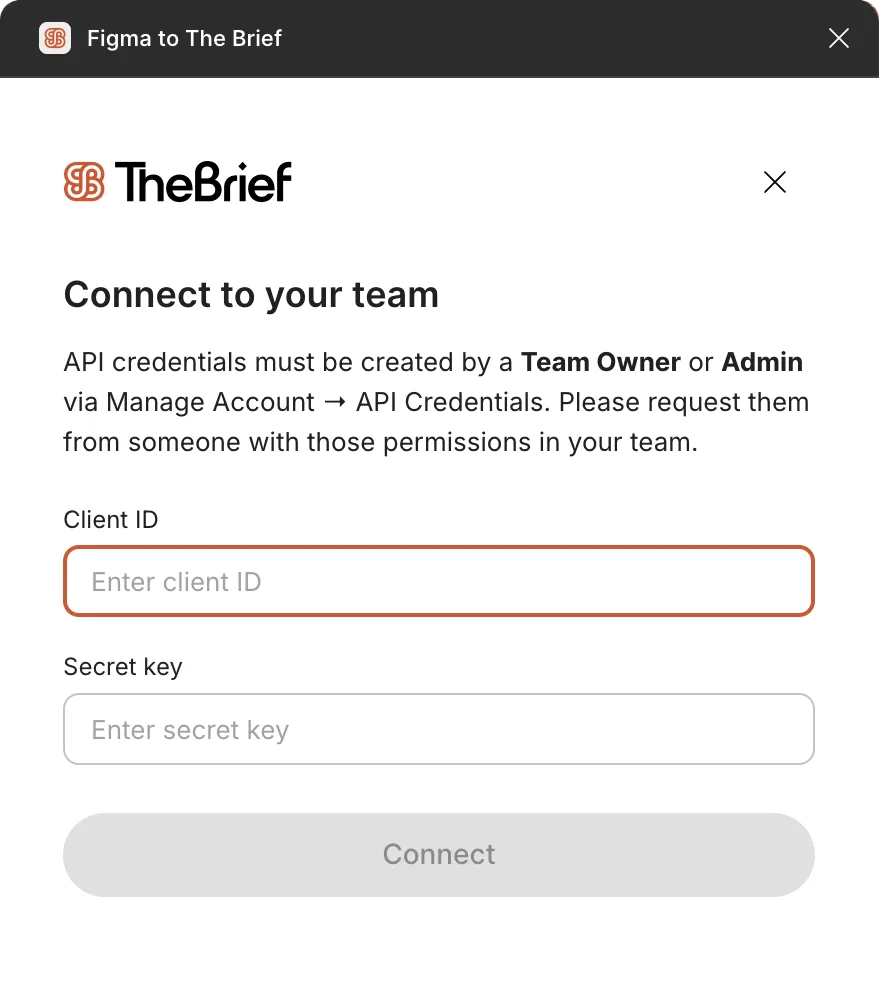
The Brief’s plugin asked for a Client ID and Secret Key. Its connection screen directs a team owner or admin to create API credentials in account settings before connecting.
In Foldwrap
Select your frames and import through the plugin. There is no manual Client ID or Secret Key setup.
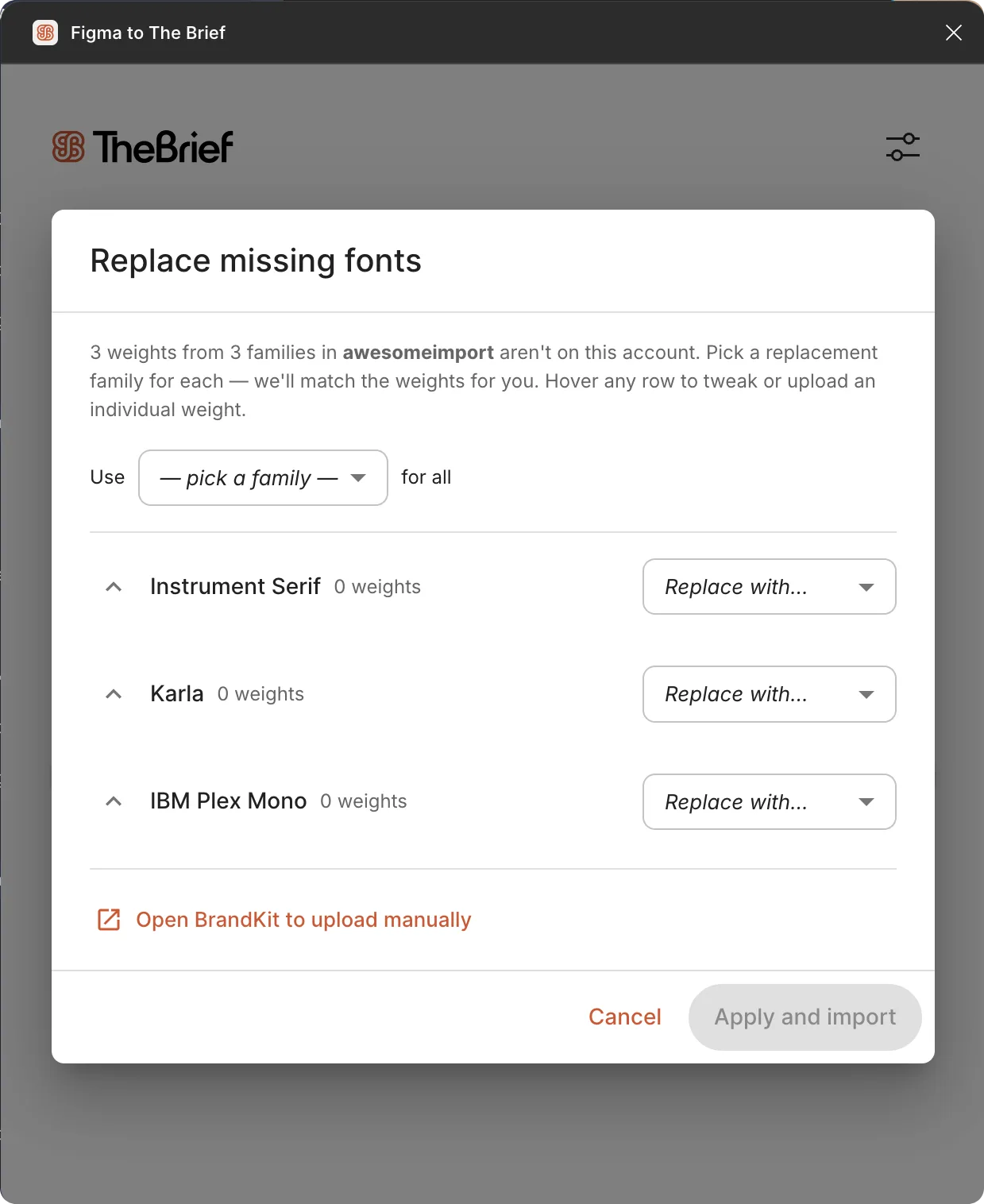
Instrument Serif, Karla, and IBM Plex Mono were flagged in the font-matching step. We could not proceed with our chosen fonts and converted the text to vector shapes as a workaround, losing text editability.
In Foldwrap
Supported Google Fonts are recognized during import, so text can remain editable without outlining it just to get past font matching.
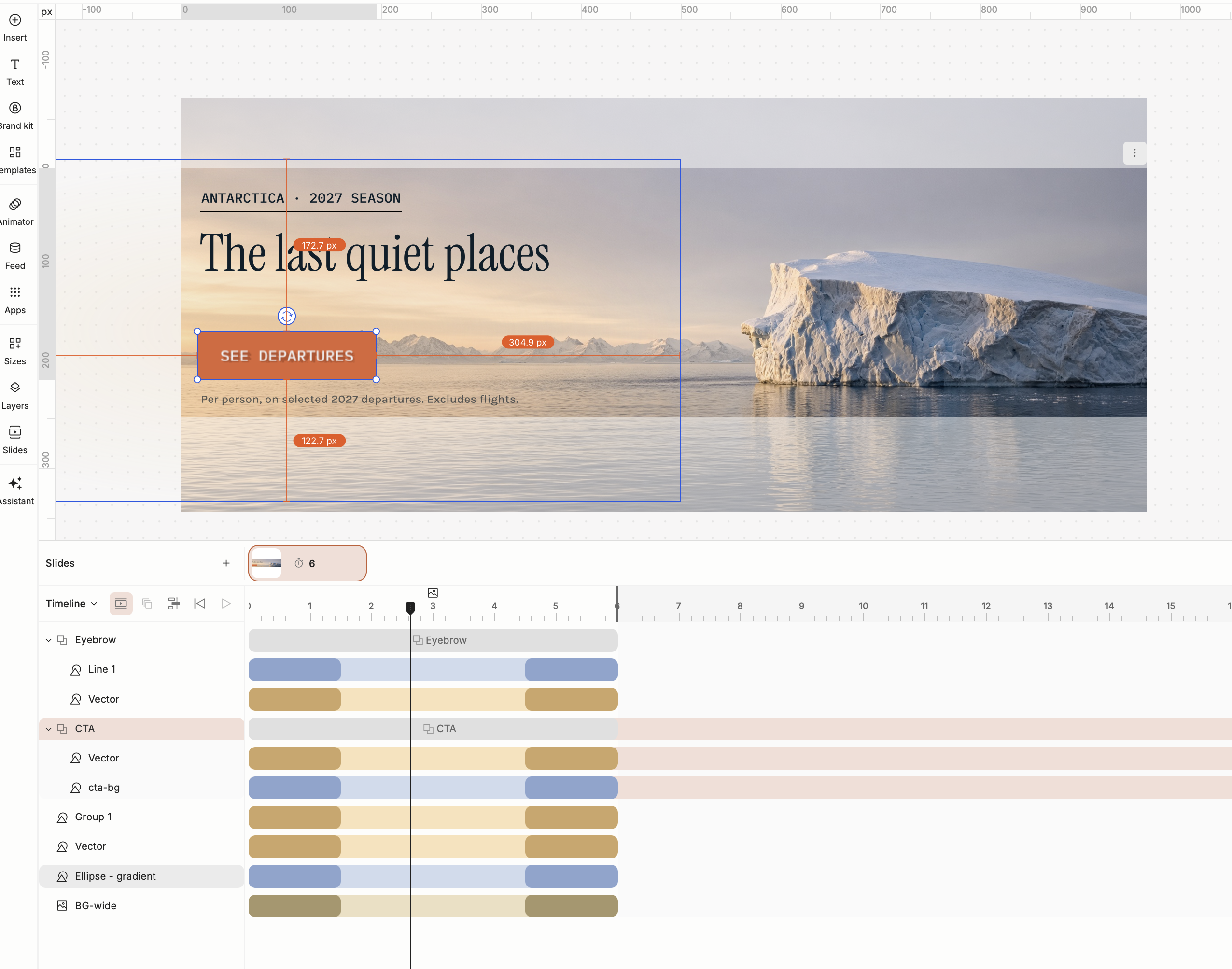
After outlining the text to get through import, one text object, now a vector, was missing. The shadow on the CTA button text was also visibly distorted compared with the approved layout.
In Foldwrap
Keep supported text and design layers editable, so revisions can happen in the editor. Complex effects and vector groups still deserve a visual check against the original Figma frame.
Foldwrap gives your import an editable first draft.
Import supported Figma layers and Foldwrap applies automatic animation. Keep text editable and refine element timing, presets, and keyframes. In our The Brief test, importing did not automatically animate the design; animation was a separate step.
Test and screenshots supplied by Foldwrap’s creator, September 22, 2026. The font dialog offers replacement or manual upload; outlining was the workaround used in this test, not the only possible workflow.
03 / Foldwrap vs. The Brief
Compare the daily production work.
Your task
Foldwrap
The Brief
Design import
Import through the Figma plugin without prerequisites. Supported Google Fonts text stays editable.
In our Figma test: API credentials required, font matching blocked progress, and the outlined import needed repairs. See the screenshots above.
Build the animation
Automatic animation on Figma import, plus editable presets, timing, easing, and individual keyframes.
Animation was a separate manual step after our import.
Make other sizes
Build a campaign set with AI resize. Refine each layout and reuse motion across matching layers.
Multi-size sets and resizing tools offered on relevant plans.
Create content variants
Turn spreadsheet rows into editable offer, product, or copy variants on eligible plans; review them with the campaign set.
Feed-based production, with plan-specific capacity and sync options.
Review a campaign
Share a side-by-side campaign preview link.
Share links and comments; additional collaboration features on team plans.
Deliver animated ads
Export all selected campaign creatives as native HTML5 packages, adapted for platforms. Video and GIF exports too.
HTML5, MP4, and GIF export. Ad serving and publishing on relevant plans.
Start with an approved Figma frame, build the sizes, and share the whole set for review. Keep the editable creatives together, then export the selected campaign files for delivery.
Import a Figma frame, refine its automatic animation, and use AI resize to make the campaign formats. Adjust each layout and copy motion to matching layers.
02
Create the offers and review the set
Generate offer or copy variations from spreadsheet data on eligible plans. Share a side-by-side preview link so the reviewer can see the sizes and messages together.
03
Export the selected campaign files
Check the formats, fonts, click tracking, and file weight, then use export-all for the selected creatives. Deliver the set from the same production workflow.
We recreated the same creative in The Brief and Foldwrap. Play both exports, compare the motion, and download the original HTML5 packages to inspect the files.
Equal preview scale. Each export keeps its own animation timing.
6 minutes. Automatic import and animation draft, manual adjustments
35 minutes. Manual animation.
ZIP package size
35.78 KB · 35,780 bytes
133.89 KB · 133,891 bytes
Unpacked file size
53.25 KB · 53,251 bytes
152.80 KB · 152,804 bytes
Files in the package
3
4
ZIPs measured September 22, 2026. KB = 1,000 bytes. Unpacked size is the sum of files inside each ZIP. Hosted libraries and fonts are excluded: these are package measurements, not total network download sizes or load-speed results. Asset formats, fonts, and animation choices differ between these exports.
The 6-minute Foldwrap production time is from the original build used in our Adobe Animate comparison; the 35-minute The Brief time is from this recreation. These are individual production sessions by Foldwrap’s creator, not a controlled benchmark or a guarantee of your production time.
06 / What we encountered
Three editing obstacles. One recorded session.
While recreating this ad in The Brief, we encountered overlapping text, a restriction on editing the decorative line’s height, and a background animation jump. This recording shows the actions and what happened on the canvas.
25-second screen recording · no audio · original sequence and playback speed. Use fullscreen to inspect the editor controls.
Text layers overlap after scrubbing
Three messages are timed to appear one after another. They display in sequence while scrubbing, but releasing the mouse reveals all three at once. The overlap makes the copy difficult to read and select on the canvas.
The hairline height cannot be adjusted
The approved design calls for a 200 × 1 px decorative line. In this session, the editor lets us change its width but not its height, leaving the line different from the intended layout.
The background jumps when scrubbing stops
The background has a smooth entrance animation. Releasing the timeline scrubber causes an abrupt shift on the canvas, making the intended motion harder to inspect while editing.
Recorded by Foldwrap’s creator while building the example above; supplied September 22, 2026. These observations describe this editor session, not the exported ad’s playback or every user’s experience.
The Foldwrap switch offer
Switch without paying twice.
Have months left on another creative platform? You get the same months free on Foldwrap. Twelve is the most we can give.
Bring your next campaign over and build it here while the old subscription runs itself out. Tell us what you’re leaving and we’ll write back with your plan, your free months, and what it costs after — before anything starts.
Your free months match the time left on your current subscription, up to 12. Eight months left means eight months of Foldwrap free. We give you Foldwrap — we can’t pay back what you already spent elsewhere.
A little breathing room
Up to12months on us
Tell us what you’re leaving.Your platform, your plan, and when it runs out.
Send us one invoice.We’ll ask by email — anything that shows you’ve already paid for it.
Know it all up front.Your plan, how many months are free, and what it costs after.
Before you move
The Brief alternative: your questions.
Is The Brief the same product as Creatopy?
The Brief is the new name for Creatopy, previously known as Bannersnack. If you are looking for a Creatopy alternative for animated banner production, this comparison addresses that workflow.
Why choose Foldwrap if The Brief also imports Figma?
The import workflow matters. Our The Brief test required API credentials, stopped at font matching for three Google Fonts families, and lost editability when we outlined the text to proceed. The resulting import also needed artwork repairs. Foldwrap requires no manual API credential setup, supports editable Google Fonts text, and applies an editable animation draft on import. These are observations from our test; check your own design, especially complex effects and groups.
Can I import my existing The Brief projects?
Foldwrap does not directly import The Brief project files. Start from your original Figma designs or artwork and recreate the motion in Foldwrap. Test one campaign before moving your full library.
Will one edit automatically update every banner size?
No. Foldwrap can copy motion and timing to matching layers in another size, but this is not live master-component syncing. Later changes require another copy, and each layout needs review.
Does Foldwrap replace The Brief’s ad serving and team governance?
No. Foldwrap focuses on creating, animating, adapting, reviewing, and exporting ads. If you rely on integrated ad serving, enterprise asset management, or advanced approval controls, evaluate those requirements separately.
How does the offer of up to 12 months free work?
However many months you have left on your current creative platform when we set things up, you get that many free on Foldwrap. Twelve is the most we can give: eight months left means eight months free. Tell us your platform, your plan, and when it runs out. We’ll ask by email for one invoice showing you’ve already paid for, then write back with your Foldwrap plan, how many months are free, and what it costs after — before anything starts. We give you Foldwrap; we can’t pay back what you already spent elsewhere.
What does Foldwrap cost without the switch offer?
Foldwrap starts at $49/month for one seat. Pro includes HTML5, video, and GIF export. AI and data-driven production allowances depend on your plan. See the pricing page for details.
Your next campaign is the real test
Make your next campaign set in Foldwrap.
Start with an editable master, or bring an approved design from Figma.