February 2026 Release: Keyframes for Faster, More Precise Banner Animation
February 2026 release focus: precise motion control without slowing production.
Many teams asked for deeper timeline editing after auto-generation, especially for client feedback like:
- "Move this reveal 200ms earlier"
- "Make the CTA entrance smoother"
- "Use the same motion pattern in all sizes"
This update delivers exactly that with Keyframes.
New: Keyframes in the Foldwrap Timeline
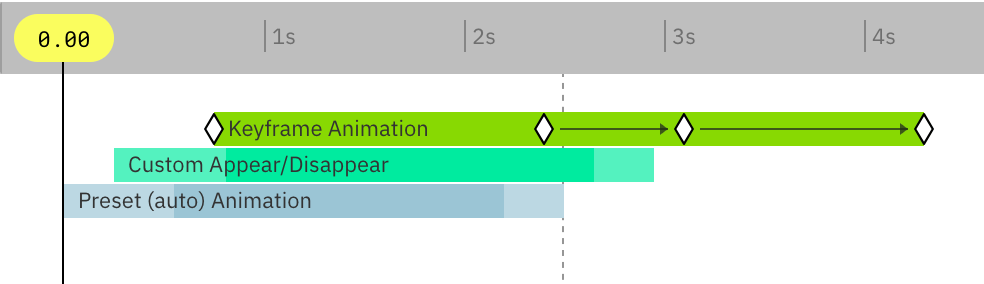
You can now animate element properties directly in the timeline with keyframes.
Add, drag, duplicate, and fine-tune keyframes without rebuilding full animation blocks.
Result: fast first draft, precise final polish.
Easing Presets That Save Real Production Time
Keyframes define motion. Easing defines feel.
We added practical easing presets for common ad animation patterns:
- Soft intro for headlines
- Snappy CTA reveal
- Smooth product image transitions
- Gentle loop motion for longer placements
You can apply easing per keyframe segment, so one element can feel calm in frame 1 and more dynamic in frame 2.
Multi-Select Keyframe Editing for Revision Rounds
Need to update many elements after feedback? Select multiple keyframes and edit timing together.
No manual one-by-one adjustments.
This helps:
- Freelancers close revision loops faster
- Agencies keep motion consistent at scale
- Brand teams reduce QA friction
Copy and Paste Keyframes Across Elements and Sizes
A frequent request from high-volume teams: reuse motion patterns across variants.
Now you can copy keyframes from one element and paste to another, including different banner sizes in the same project.
This is especially useful for:
- 300x250 to 300x600 adaptations
- Language variants
- Campaign sets with repeated product blocks and CTA patterns
Cleaner Timeline for Longer Creatives
Alongside keyframes, we also improved timeline usability:
- Better keyframe visibility at different zoom levels
- Faster snapping for cleaner alignment
- More predictable drag behavior during dense edits
Small changes, big impact when deadlines are tight.
Updated Workflow: From Concept to Export
- Import design from Figma.
- Generate the base animation automatically.
- Use keyframes to refine hero moments, CTA timing, and loops.
- Export lightweight HTML5 banner creatives.
You still get speed. Now you also get precision.
Why This Release Matters
Foldwrap was built to remove repetitive ad production work. With keyframes, it now covers both ends of the workflow:
- Fast generation for first versions
- Fine motion control for final delivery quality
For freelancers, this means fewer late-night revision loops. For agencies, faster delivery at larger scale. For brands, more consistent motion quality across campaign assets.
Read more in the animation help article.
Thanks for the feedback and edge-case examples. They directly shaped this release.