A CreateJS banner from Adobe Animate can look simple and still ship a heavy package. Our 970×250 Animate export is a 415,414-byte ZIP. A Foldwrap rebuild of the same campaign is 35,780 bytes, less than a tenth of that.
It's easy to blame CreateJS for the difference, and the runtime does cost something: 242 KB loaded from outside the ZIP. But most of the package gap is one background photo, which Animate exported in a format that made it both heavier and lower quality. Below we open both packages, separate image, code, and runtime costs, and test how far the Animate banner can slim down without leaving Animate. Even with the photo fixed, its package stays about 3.7 times the size of Foldwrap's. Then we look at what to use instead for a typical photo, headline, and CTA banner. Canvas still has its place when the artwork or interaction calls for it.
Disclosure: I build Foldwrap. Sixty South is a fictional campaign we made for these tests, not client work. Byte counts checked October 12, 2026. Both exports and the Animate source file are downloadable below.
What is a CreateJS banner?
Here, a CreateJS banner means an Adobe Animate ad published as an HTML5 Canvas document. Animate generates an HTML page plus JavaScript that rebuilds the stage and timeline with CreateJS. Adobe documents the workflow in its HTML5 Canvas publishing guide.
Canvas itself is a browser API for drawing with JavaScript (MDN overview). It doesn't need CreateJS; that dependency comes from Animate's publishing workflow. Canvas ads and ads built from HTML elements are both HTML5, so "Canvas vs HTML5" is the wrong question. The useful distinction is drawing pixels into one canvas versus animating individual page elements.
Our Animate export is the first kind: one <canvas> element, and generated JavaScript that builds 190 vector shapes, one bitmap sprite, and a timeline. The Foldwrap export is the second: HTML elements, CSS, and a GSAP animation timeline.
Where the weight comes from
1. One background photo
The largest file in the Animate package is index_atlas_P_1.png, a 398,052-byte sprite sheet. It holds a single image: the 2500×500 background photo, which the banner shows at 50% scale. That gives the photo 2× density for high-resolution screens and spare width for a slow 120-pixel drift. The sheet itself is 4096×512; everything outside the photo is transparent padding.
The format is the bigger surprise. Our publish settings exported the sheet as an 8-bit PNG, so Animate reduced the photograph to a 126-color palette and dithered the result. The PNG is lossless only after that reduction. Zoom in and the sky and ice show the dither noise.
The Foldwrap package uses a 28,394-byte JPEG at the banner's own 970×250 size, plus a 5,952-byte SVG logo.
How much would a better encode save?
The FLA still contains the original photo, a 2500×500 RGB PNG. We encoded it with libjpeg-turbo 3.2.0 (cjpeg -quality 80 -optimize -progressive). These are image tests, not new Animate exports:
| Same photo | Pixels | Bytes |
|---|---|---|
| Animate sprite sheet, 8-bit PNG, as exported | 2500×500 in a 4096×512 sheet | 398,052 |
| JPEG, quality 80 | 2500×500 | 109,890 |
| JPEG, quality 80, half size | 1250×250 | 33,027 |
| Foldwrap background JPEG, for reference | 970×250 | 28,394 |
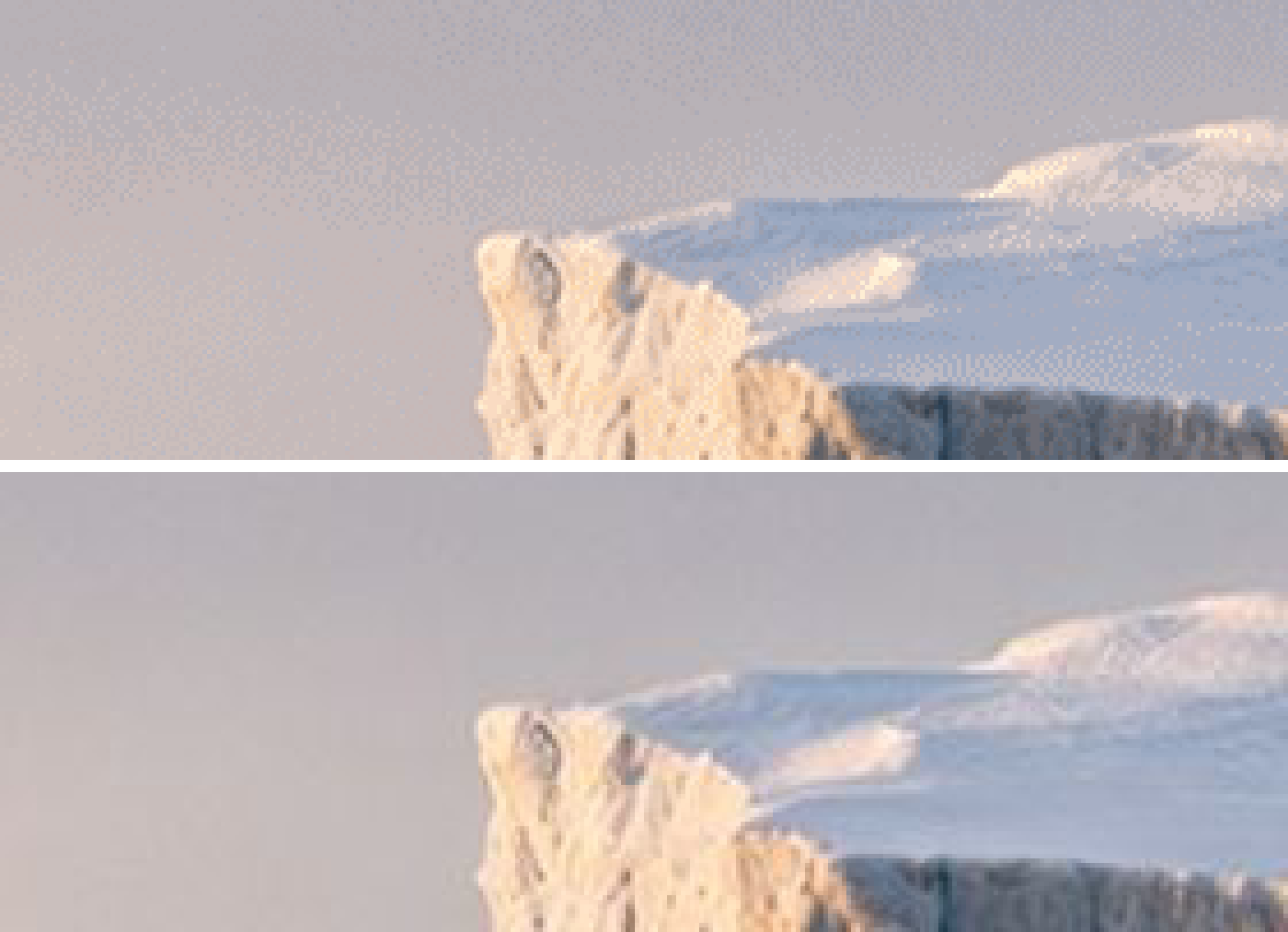
At the same 2× resolution, the JPEG is 72% smaller than the exported sprite sheet and has no palette dither. Halving the resolution, while keeping room for the drift, brings it to about a twelfth of the original, at the cost of sharpness on high-density screens. That puts it in the same range as Foldwrap's background.
Simple arithmetic: swapping the quality-80 JPEG in for the PNG would bring the Animate package from 482,900 to about 194,700 bytes unpacked. That's less than half, though still about 3.7 times Foldwrap's package; add the runtime and it's about 437 KB of resource data against Foldwrap's 125 KB before fonts. The two builds made other different choices too, so this doesn't isolate the cost of Canvas, and it isn't the lightest banner Animate can export. It does show where to look first.
2. The CreateJS runtime
The Animate sample loads CreateJS 1.0.0 from the CreateJS CDN. That minified file is 242,057 bytes; requested with gzip, the CDN sent 63,926 bytes. It isn't in the ZIP, but the banner can't play without it.
The file bundles all four CreateJS libraries: EaselJS for drawing, TweenJS for tweens, PreloadJS for asset loading, and SoundJS for audio. This banner has no sound, and the full bundle loads anyway. Splitting it buys little: the three libraries the export uses, loaded as separate files from the same CDN, total 219,795 bytes, only about 22 KB less.
Hosting a library externally changes where it downloads from, not whether it downloads. Whether it counts toward a delivery limit depends on the destination's rules. Whether it transfers on a given visit depends on caching and the server response.
The Foldwrap sample has external dependencies too: GSAP 3.11.5 from Google's ad CDN, 71,373 bytes (27,946 with gzip), plus Google Fonts stylesheets and font files. GSAP is under a third of CreateJS's size, but leaving CreateJS doesn't mean leaving every library or font request behind.
3. Generated artwork and timeline code
The Animate sample also has 81,800 bytes of generated JavaScript on top of CreateJS, with shape compaction already on in the publish settings. The logo and every line of copy are vector outlines rather than text, so the lettering lives in index.js as drawing commands. That keeps it true to the typeface without loading a font, but a price change means republishing from the FLA.
The Foldwrap HTML, CSS, and inline animation code total 18,905 bytes. Its copy is live text: editable in the HTML and readable by assistive technology, with the font cost moved to Google Fonts. Outlines and live text put their bytes in different places; neither is smaller by default.
Measured: the same campaign in two exports
Both banners interpret the same 970×250 Sixty South cruise offer: photograph, headline, itinerary, price, CTA, and legal copy. They are separate builds, with differences in timing, easing, and rendering. These are the same exports used in our timed Animate rebuild walkthrough.
| File or measurement | Adobe Animate | Foldwrap |
|---|---|---|
| HTML, including any inline CSS and JavaScript | 3,048 bytes | 18,905 bytes |
| Separate creative JavaScript | 81,800 bytes | None |
| Raster image | 398,052 bytes, 8-bit PNG | 28,394 bytes, JPEG |
| SVG image | None | 5,952 bytes |
| Total unpacked files | 482,900 bytes | 53,251 bytes |
| Original ZIP | 415,414 bytes | 35,780 bytes |
| Files inside ZIP | 3 | 3 |
| External resources, excluded above | CreateJS | GSAP + Google Fonts |
KB = 1,000 bytes. Unpacked totals add up the file sizes listed inside each archive; ZIP totals are the original downloadable files, archive overhead included. The live previews reuse our comparison-page files, and Foldwrap's preview omits an unused animation branch that is still in its ZIP, so every number here comes from the ZIPs.
The unpacked gap is 429,649 bytes, and 363,706 bytes of it, about 85%, is image data. Hosted CreateJS accounts for none of the ZIP gap, because it isn't in the archive.
For this creative, the Foldwrap package is under a tenth of the Animate one. It's one campaign, not a controlled test of the lightest banner each tool can produce, and we haven't measured load time, CPU use, or frame rate.
ZIP size is not total network transfer
Keep three measurements separate:
| Measurement | What it answers |
|---|---|
| ZIP bytes | How large is the file being uploaded? |
| Unpacked bytes | How much file data does the package contain? |
| Browser transfer bytes | How much did this load actually download, including external resources? |
Adding the uncompressed CreateJS file to Animate's unpacked total gives 724,957 bytes of resource data. The same arithmetic for Foldwrap, unpacked files plus uncompressed GSAP, gives 124,624 bytes, before its font stylesheets and font files. Neither figure is a measured transfer. With gzip, the two libraries alone shrink to 63,926 and 27,946 bytes, and a cached copy may not transfer at all.
To reproduce the package numbers, download both ZIPs and run unzip -l on each. To measure loading, serve each unpacked banner over HTTP, open the browser's Network panel, disable the cache, clear the log, and reload. Include external scripts, font CSS, fonts, and images. Record transferred bytes separately from decoded resource sizes, and use the same browser and conditions for both banners.
For delivery limits and external-library rules, check the ad platform spec catalogue. A CDN URL alone doesn't prove a resource is allowed, or exempt from a weight limit.
Playback: fixed frame rate vs the browser's refresh cycle
File weight is only part of playback. Our Animate export sets createjs.Ticker.framerate to the document's 60 fps and never sets a timing mode, so CreateJS falls back to its default setTimeout timer. That's a target rate, not a guarantee, and it isn't aligned with the display's refreshes. On every tick, CreateJS redraws the canvas stage.
Foldwrap's HTML5 output runs a time-based GSAP timeline driven by requestAnimationFrame, with no fixed document frame rate. On a high-refresh display, motion can update on every refresh without reauthoring the animation. The GSAP ticker documentation explains how updates follow the browser, and how background tabs get throttled.
Animating HTML elements also lets the browser optimize movement and fades through CSS transforms and opacity, which can skip layout and paint work. The actual rendering path depends on the content and browser; Google's guide to high-performance animations covers the details.
This describes the exports above, not a hard CreateJS limit. One line in the exported HTML, createjs.Ticker.timingMode = createjs.Ticker.RAF_SYNCHED;, keeps the 60 fps target but schedules ticks with requestAnimationFrame (Ticker docs). Avoid plain RAF mode here: Animate's timelines advance one frame per tick, so on a 120 Hz screen the banner would play twice as fast. Actual smoothness depends on the creative, browser, and device, and we haven't benchmarked it.
How to reduce an existing CreateJS banner
If this banner has to ship from Animate, these fixes help. They don't remove the runtime, the outlined text, or the rework every new size needs. Start with the biggest measured cost:
- Fix the image format first. A photo without transparency doesn't need PNG, and an 8-bit palette is a poor fit for soft gradients like a sky. In our test, a quality-80 JPEG of the same photo was 72% smaller than the exported sheet. Then decide whether the creative really needs 2× density. Compare gradients, edges, and text at delivery size after each change.
- Review the publish settings. Animate's Canvas publish settings cover sprite sheet export and its image format, hosted libraries, hidden layers, and Compact Shapes. Check yours against Adobe's publishing documentation, or open our FLA to compare.
- Leave the runtime alone. The generated code depends on CreateJS, and splitting the bundle saves only about 22 KB. Record its cost separately from your artwork, and check how your destination treats hosted libraries.
- Check the actual destination. Confirm its accepted external resources, click-tracking setup, dimensions, and limits. Run the exported ZIP through the HTML5 banner validator, then test on the platform itself. Passing preflight doesn't guarantee acceptance.
Measure again after every change. In this sample, working only on the JavaScript would leave the largest file untouched.
What to use instead of CreateJS for banner ads
For a banner built from photos, live copy, fades, and movement, an HTML/CSS workflow is worth evaluating. Pick the authoring tool by your source artwork and the revisions you expect to make.
| Your production task | Alternative to evaluate | Tradeoff to check |
|---|---|---|
| Approved Figma layouts becoming an animated size set | Foldwrap | Inspect imported fonts, effects, and crops; refine animation and every size. |
| Responsive layouts, dynamic bindings, or custom interactive ads | Google Web Designer | Learn its document and publishing model; measure its exported dependencies too. |
| A tightly constrained custom template maintained by developers | Hand-authored HTML/CSS with CSS animation or a JavaScript timeline | Your team owns authoring, revisions, click tracking, and QA. |
| Detailed drawn animation or established Animate symbols and scripts | Keep and optimize the Animate workflow | Animate is in maintenance mode, with no new features. Compare upkeep with a real rebuild. |
Google documents GWD's responsive layouts, animation tools, and dynamic workflow on its product site. For the broader decision, see Adobe Animate vs Google Web Designer vs Foldwrap.
Foldwrap is built for the first row. Import approved frames with the Figma plugin as editable layers with live text. An automatic animation draft gives you a timeline to adjust by hand, and Motion Copy carries the timing to the other sizes. Export produces an HTML5 ZIP for each target platform, checked against its published specs. Images are encoded per file, the step that cost the Animate sample most: JPEG when opaque, compressed PNG when transparent, WebP where the platform accepts it, downscaled to the density you pick (1×, 1.5×, or 2×).
Weight is one cost; production time is the other. In our timed rebuild, this 970×250 took 1.5 hours to build in Animate. Foldwrap produced it and two more sizes in 3 minutes from finished Figma frames, keyframes adjusted by hand.
There is no FLA-to-Foldwrap converter. Timelines, symbols, and frame scripts need rebuilding. Keep the original FLA for edits to archived banners, and try the new workflow on your next live campaign. The Adobe Animate alternative hub covers that migration path.
Download and inspect the files
- Adobe Animate HTML5 Canvas ZIP, 970×250 — 415,414 bytes.
- Original Animate FLA source, including the source photo and publish settings.
- Foldwrap HTML5 ZIP, 970×250 — 35,780 bytes.
Test them against your own delivery brief. Or bring one of your own Animate banners, and we'll rebuild it with you.
Start with one real campaign
Bring the banner set.
We’ll rebuild it with you.
We’re confident Foldwrap can speed up your banner production. But learning a new tool takes time and mental effort, even when it makes the work easier. Bring a set you already made in Animate. We’ll help rebuild its animation, sizes, and export settings in Foldwrap.
What to bring
- Source artwork and any editable design files
- A preview of the animation you want to recreate
- The required sizes and destination ad platform
You keep the editable master, .foldwrap source file and exported files, whether or not you continue with Foldwrap.
Have approved Figma designs?
See the Figma import workflow ↗
Common questions
Does HTML5 Canvas require CreateJS?
No. Canvas is a browser API. Adobe Animate's HTML5 Canvas publishing workflow uses CreateJS, but developers can use Canvas directly or with other libraries.
Can I remove CreateJS from an Adobe Animate banner?
Not by deleting the script reference from a generated export. The generated animation depends on CreateJS. To remove that dependency, rebuild the animation with another rendering and animation approach.
Why is my CreateJS banner ZIP so large?
Open it and check the files first. In our sample, one 398,052-byte sprite sheet holding a 2× background photo as an 8-bit PNG is most of the package, while CreateJS loads from a CDN and adds nothing to the ZIP. Your export may bundle the library or use different assets.
How can I make an Adobe Animate banner smaller without rebuilding it?
Start with the images. Store photos without transparency as JPEG rather than PNG, and check whether they need 2× resolution. In our test, the same 2500×500 photo went from 398,052 bytes in the exported sprite sheet to 109,890 bytes as a quality-80 JPEG. Then review the publish settings and measure again after each change.
Are Canvas banners always heavier than HTML/CSS banners?
No. Images, fonts, drawing instructions, libraries, and export settings all affect weight. Our Foldwrap rebuild has a smaller package, but most of the unpacked difference comes from image assets. It is not a universal renderer benchmark.
Does Foldwrap export banners without any external libraries?
There is no CreateJS. The measured sample loads GSAP 3.11.5 from Google's ad CDN (71,373 bytes, under a third of the CreateJS file) and Google Fonts for its live text. Check how your destination treats hosted libraries.