Most "switch from Animate" articles compare feature lists. This one takes one real campaign creative and builds it twice: first by hand in Adobe Animate, then in Foldwrap from the same design. It then puts both exports side by side and measures them byte by byte.
You can download both ZIPs and the original .fla below. Every number on this page comes from those files.
The short version
| Adobe Animate | Foldwrap | |
|---|---|---|
| Elapsed production time | 1.5 hours for the 970×250 alone: assets imported by hand, every tween authored by hand | 3 minutes for the whole size set, 970×250 included: Figma frames imported by the plugin, automatic animation draft, keyframes and timing adjusted by hand, Motion Copy to the other sizes |
| ZIP package | 415 KB (415,414 bytes) | 36 KB (35,780 bytes) |
| Unpacked files | 482.9 KB, 3 files | 53.3 KB, 3 files |
| Runtime loaded from a CDN | CreateJS 1.0.0 (242.06 KB) | GSAP (71.37 KB) + Google Fonts (54.05 KB) |
| Total network download, estimated | ≈ 725 KB | ≈ 179 KB |
| What the banner is made of | One <canvas>, text drawn as vector shapes | Native HTML elements, CSS and live text |
KB = 1,000 bytes. The network totals add every resource each banner requests. Browsers may cache the shared libraries across creatives, and transfer sizes vary with server compression.
The campaign
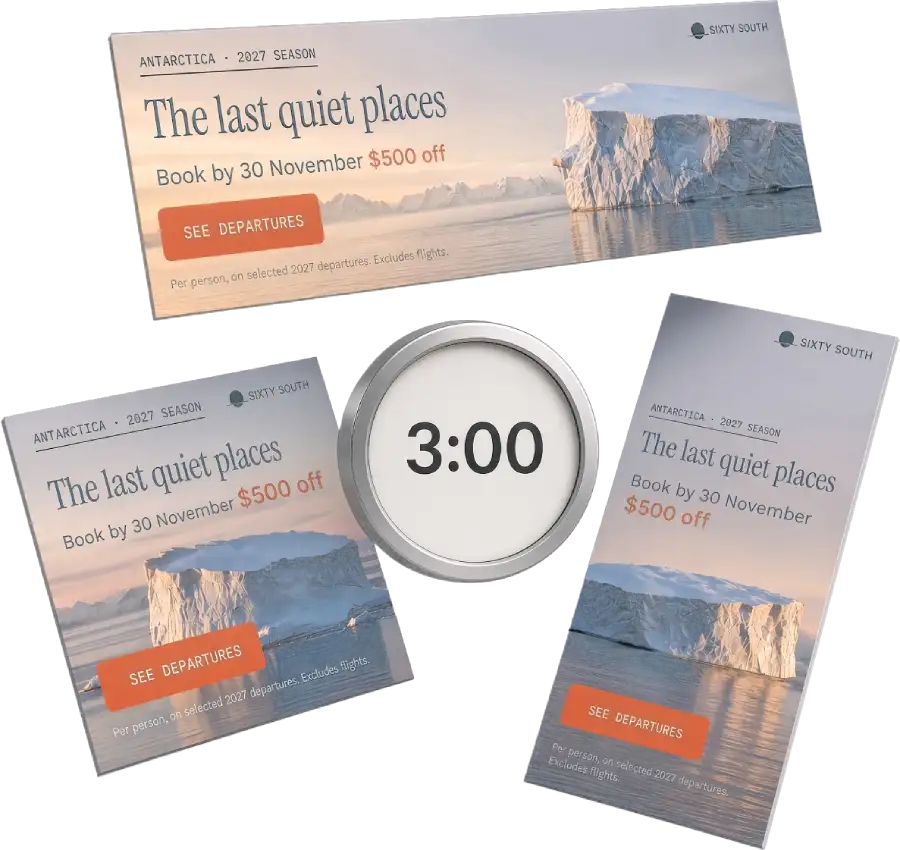
The test creative is a 10-second offer banner for Sixty South, a fictional Antarctic expedition-cruise brand we built for this test. It isn't client work, but it is shaped like client work. It has a photographic background, three typefaces, a brand mark, a CTA, legal copy, and a message sequence that changes the offer mid-play:
- Eyebrow, logo, and headline: The last quiet places
- Supporting line: 11 nights from Ushuaia. Small ship, 76 guests, then the CTA
- Price: From $8,450, with the legal line
- Offer: Book by 30 November, $500 off
The iceberg drifts slowly across the full 10 seconds, and the banner plays once. That is a typical travel or retail brief: nothing exotic, and exactly the kind of work that fills an Animate producer's week.
Build 1: Adobe Animate, 1.5 hours
The Animate version was built the way most banner producers still work in it:
- Artwork imported by hand. The background photo, logo, CTA, and copy were brought onto the stage and arranged to match the design.
- Every motion authored by hand. Each entrance, hold, the offer swap, and the background drift were keyed on the timeline.
- Published as an HTML5 Canvas document, using Adobe Animate 24.0 build 5 at 60 fps, with the JavaScript/HTML format, spritesheet image export, and hosted libraries.
None of that is a criticism of the tool. Animate's timeline is a mature authoring environment, and 1.5 hours for a polished 970×250 with a four-beat sequence is a reasonable professional pace. The time goes into work that isn't creative: rebuilding a layout that already exists in the approved design, then keying the same kinds of fade over and over.
Build 2: Foldwrap, 3 minutes
The same campaign, starting from the approved design in Figma, with every size of the set laid out there:
- Import. The Foldwrap Figma plugin sent the campaign's frames into one creative, one variant per size. Text stayed live and editable, the logo stayed a vector, and the photos came in as image layers.
- Automatic animation draft. Each size opened already animated, with entrance order, fades, and timing for every layer.
- Master motion, by hand. The draft was a start, not the result. On the 970×250, the iceberg's default fade became two keyframes: a slow slide in from the side, with Sine Out easing so it settles smoothly. The text was spaced out on the timeline so each message shows on its own, long enough to read, and playback was set to play once.
- Motion Copy to the other sizes. Copying animation across sizes matched every element automatically, except the photo in the square and in the last format. Those sizes use a different crop of the image, so each got its own two keyframes.
- Export all sizes as HTML5, previewed side by side, and downloaded with the general-usage preset.
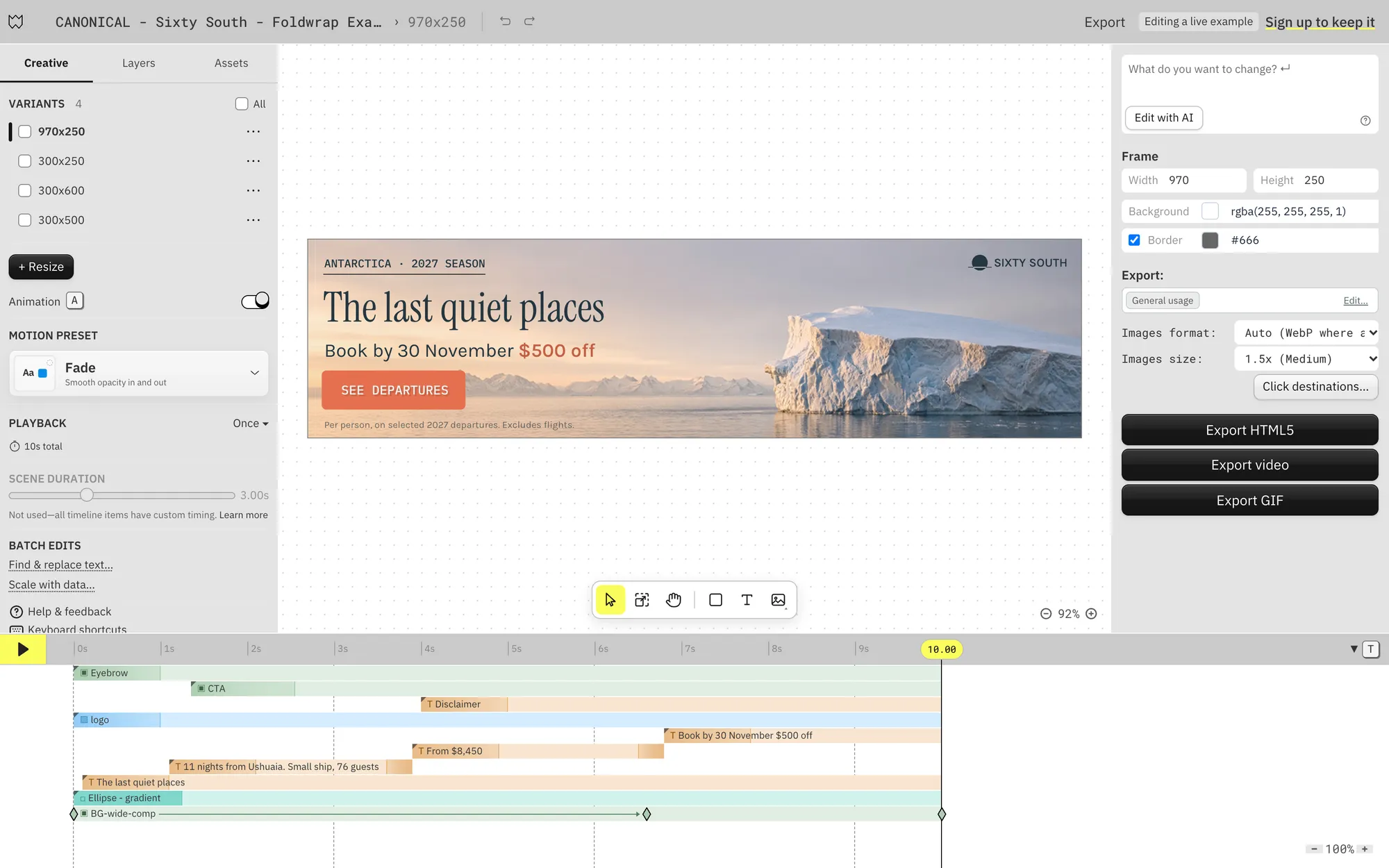
The 3 minutes covers the whole set, not just the 970×250: import, motion for every size, and export. The Animate figure is 1.5 hours for the 970×250 alone. Both builds assume the design is already approved; the Foldwrap build also had every size laid out in Figma. If your artwork only exists inside .fla files, add the time to get it back into a design tool first (see what didn't transfer).
Same banner, two exports
Played side by side, the two banners tell the same story with the same beats.
The differences are small but real:
- Text sharpness. In this Animate export, the text isn't text: every line is drawn as vector shapes that CreateJS paints onto the canvas. With our publish settings (responsive scaling off), the 970×250 canvas rendered at 1× and looked softer on a high-density screen. Foldwrap's text is native HTML text, so the browser renders it sharp at any pixel density, and it stays selectable and readable by assistive technology.
- Editability after export. Changing the price in the Animate package means editing drawing commands in an 82 KB
index.js, or going back to the.flaand republishing. In the Foldwrap package, the price is a line of text inindex.html. - Motion. Both builds use the same beats. Easing curves differ slightly, and the Animate drift covers a little more distance. Neither is "more correct"; they are two hands on the same brief.
Where the 415 KB went
The two packages hold the same number of files, but they are very different sizes:
| File | Adobe Animate | Foldwrap |
|---|---|---|
index.html | 3,048 bytes | 18,905 bytes |
| Animation code | index.js: 81,800 bytes | inline in index.html |
| Background image | index_atlas_P_1.png: 398,052 bytes | BG-wide-B.jpg: 28,394 bytes |
| Logo | drawn as vector shapes in index.js | 8_120.svg: 5,952 bytes |
| Unpacked total | 482,900 bytes | 53,251 bytes |
82% of the Animate package is one sprite sheet. Animate's spritesheet export packed the background photo into a 4096×512 PNG. The photo occupies a 2500×500 region of it, and the rest is empty padding. A lossless PNG is the wrong container for a sunset photograph, and the power-of-two sheet adds about 40% blank area on top.
Foldwrap exported the photo as a JPEG at the banner's own 970×250 size, at 7% of the bytes. That isn't a pure format win: Animate kept a larger 2500×500 bitmap, which holds more detail for high-density screens. Part of the gap is resolution; most of it is PNG versus JPEG plus the padding.
You can shrink Animate's number with work: export the bitmap separately, pre-compress it, and tune the publish settings. We published with typical settings on purpose, because that's what a producer under deadline ships. The CreateJS runtime is the part you can't tune away: it is 242 KB on top of any creative, before your artwork loads.
Does the weight matter?
It depends on where the banner runs. Checked against published specs in our ad platform spec catalogue:
- Google Ads: 600 KB ZIP, 40 files. Both packages fit.
- Simpli.fi: 250 KB ZIP. The Animate package is over the limit as published; the Foldwrap package fits.
- AdRoll: 150 KB ZIP. Same result.
Fitting a published limit doesn't guarantee acceptance: platforms also check click tracking, external requests, and account eligibility. Run your own ZIP through the free HTML5 banner validator before delivery either way.
And of course, a smaller file size means faster load times, reducing the chance that the ad gets stuck loading and is skipped. Foldwrap always optimizes files whenever it can do so without compromising quality.
From one banner to the set
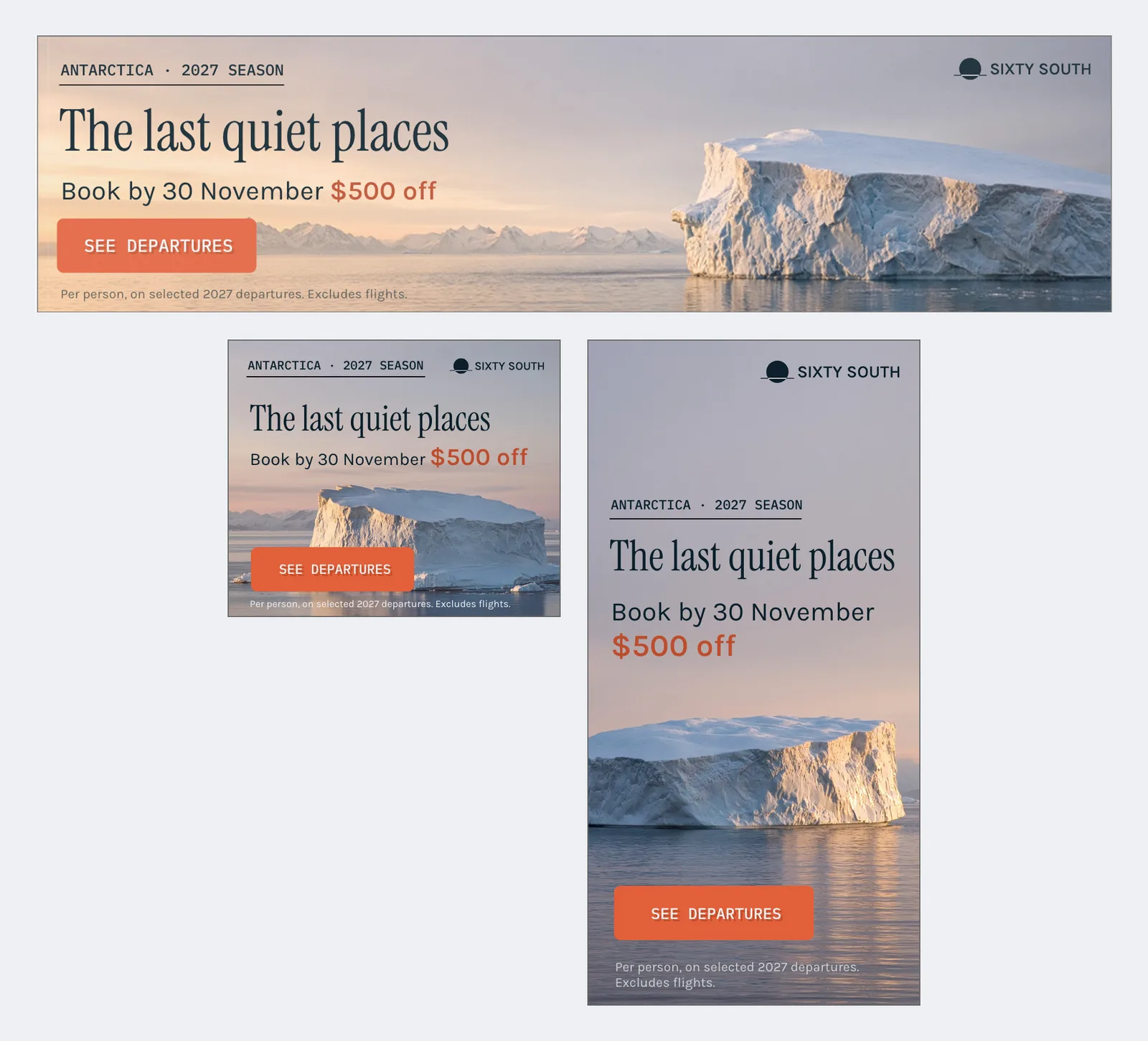
A migration only pays off when the whole delivery list gets cheaper, not just the first size. The same creative in Foldwrap holds the rest of the set as variants: 970×250, 300×250 and 300×600, each with its own layout and its own copy of the timing.
A few honest notes on this part:
- The layouts came from Figma. Each size was designed there and imported with the rest: the 300×600 gives the iceberg the lower half, and the 300×250 tightens everything. If you only have one approved size, AI resize gives you a first layout for the others, but you still review and adjust it, and that time isn't in this test.
- Motion carries across, with checks. Motion Copy maps the master's timing onto matching layers in each size while keeping that size's layout. Here it matched everything except the swapped photo, which needed its own keyframes. Movement distances need a look in every size.
- The set is inside the 3 minutes. The Animate build exists in one size, so the like-for-like comparison is 1.5 hours for one banner against 3 minutes for the set that includes it. Rebuilding the other sizes in Animate would add to its side, but we haven't timed that, so we don't claim a number.
If you want to judge the set yourself, open the live example in the editor. It's the same creative, and it needs no sign-up to explore.
What didn't transfer
This is the part most migration pages skip:
- The
.flafile. Foldwrap does not import Animate projects. Nothing converts timelines, symbols, or ActionScript/JavaScript frame scripts. The rebuild starts from the design source (Figma here), not from the Animate file. - The motion itself. The Foldwrap timing came from the automatic draft plus manual adjustment. Easing and drift distance ended up slightly different from the Animate build (see above).
- Character and frame-by-frame animation. Not relevant for this campaign, and not something Foldwrap tries to replace.
What did carry over cleanly: the approved design, the fonts, the copy, the message sequence, and the brief.
Download the files
Inspect everything yourself. Both packages are unchanged from export:
- Foldwrap HTML5 ZIP, 970×250 (35,780 bytes)
- Adobe Animate HTML5 ZIP, 970×250 (415,414 bytes)
- Adobe Animate
.flasource (5.6 MB)
Unzip them, open index.html in a browser, and open the network panel. Run them through your usual QA, or drop them into the HTML5 banner validator.
For a closer look at those bytes, see our CreateJS banner weight breakdown: image assets, generated code, external runtime, and what to optimize first.
Should you replace Adobe Animate for your banner ads?
Probably not all of it, and not all at once. Adobe has no published end-of-life date for Animate yet, so there's no hard deadline to rebuild against. What this test shows is where the time goes. Most of the 1.5 hours was rebuilding layout and keying fades, and that work repeats for every size and every revision.
A practical path:
- Keep the archive in Animate. Old campaigns you won't rerun don't need migrating.
- Rebuild the next live campaign, not the last one. Start from the approved design, as in this test, and time it.
- Judge on the set, not the first size. Compare the full delivery list and the first client revision, then decide.
For the tool-level comparison, see Foldwrap as an Adobe Animate alternative.
Still choosing a workflow? Our Adobe Animate vs Google Web Designer vs Foldwrap comparison adds the GWD version of this campaign, all three downloads, and recommendations by production task.
Start with one real campaign
Bring the banner set.
We’ll rebuild it with you.
We’re confident Foldwrap can speed up your banner production. But learning a new tool takes time and mental effort, even when it makes the work easier. Bring a set you already made in Animate. We’ll help rebuild its animation, sizes, and export settings in Foldwrap.
What to bring
- Source artwork and any editable design files
- A preview of the animation you want to recreate
- The required sizes and destination ad platform
You keep the editable master, .foldwrap source file and exported files, whether or not you continue with Foldwrap.
Have approved Figma designs?
See the Figma import workflow ↗
Common questions
Can Foldwrap import my .fla files?
No. Foldwrap does not open .fla projects or convert Animate timelines, symbols, or scripts. Rebuild from the design source, such as a Figma file, source artwork, or an editable example.
Is the 3-minute figure realistic for my work?
It covers the whole size set, built from approved Figma frames with every size already laid out, including keyframes, timing adjustments, Motion Copy, and export. Campaigns with more layers, custom motion, or artwork that must first be recovered from .fla files will take longer. Time your own first rebuild.
Will the Foldwrap export pass my ad platform?
The package is checked against published specs through export presets and preflight, but that doesn't guarantee acceptance. Test the actual ZIP on your destination platform, including click tracking.